> For the complete documentation index, see [llms.txt](https://kb.linknlink.com/isg/llms.txt). Markdown versions of documentation pages are available by appending `.md` to page URLs; this page is available as [Markdown](https://kb.linknlink.com/isg/faq/updating-related/why-i-cant-get-zigbee-firmware-update-on-isg-display-max.md).
# Why I Can't Get Zigbee Firmware Update on iSG Display Max
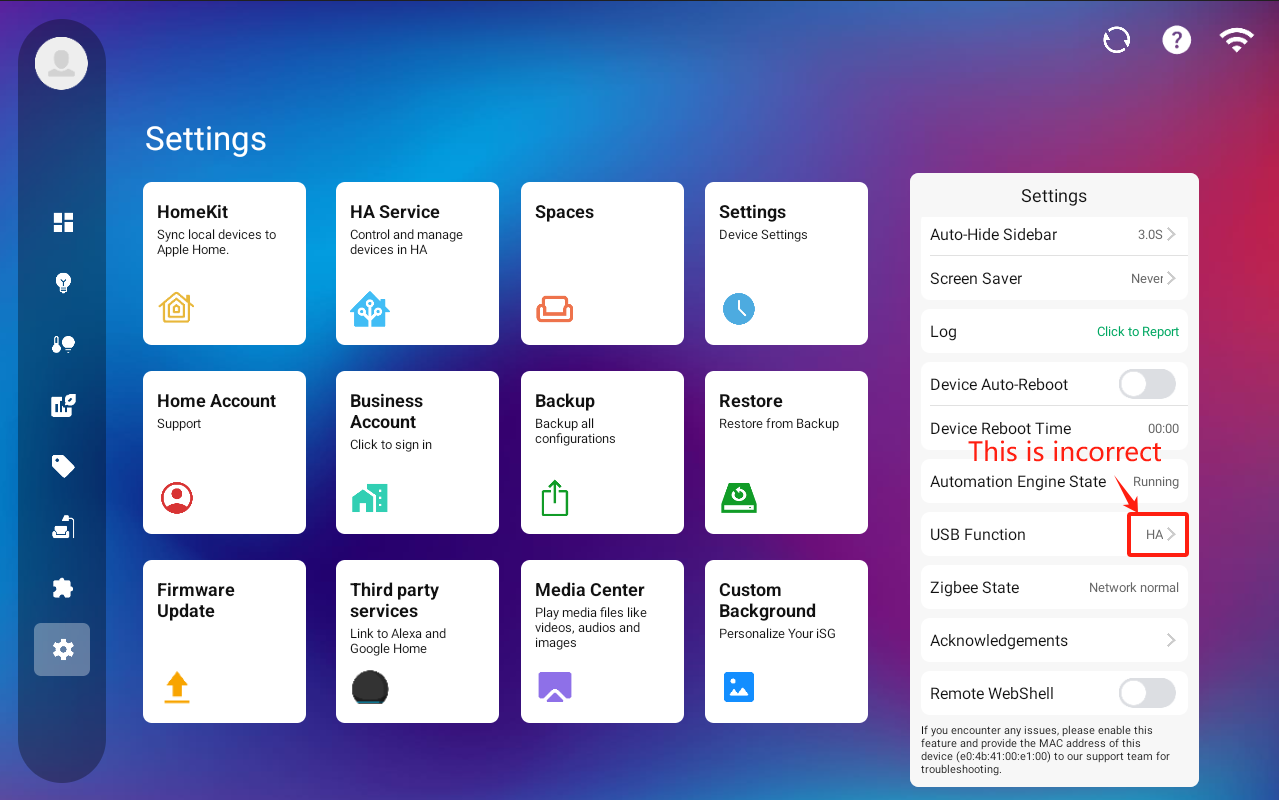
All iSG Display Max devices come with a built-in Zigbee radio running the iSG version firmware. You may have already updated the iSG software to V20120 following the instructions in the [**Knowledge Base article "Firmware Updates | Built-In Zigbee Firmware"**](broken://pages/cthkBPmuX9pU63XMFhcV) and attempted to upgrade the Zigbee firmware to the ZHA version. In some cases, the Zigbee version may display as "ZHA" (as shown in the screenshot below), but it is still actually running the iSG version.
To resolve this, follow these steps:
1. Download the updated iSG software, version [**20121\_x64\_Beta**](/isg/settings/system-updates/local-update/isg-downloads.md), and use an SD card or USB drive to apply the update. The iSG will automatically reboot after the installation.
2. Go to **Settings > USB Function**. If the option is set to "HA", click to change it to "Normal USB" and ensure the Zigbee State reads "Network normal".
3. Afterward, return to **Firmware Update**, and the iSG will correctly identify the current Zigbee firmware and prompt you to update it to the ZHA version.